
What Is GitHub Actions OIDC?
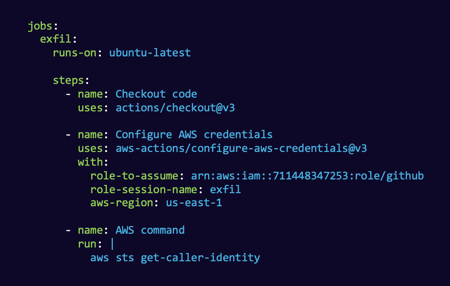
How the Trust Model Works
The GitHub Actions OIDC flow involves three parties: GitHub (the identity provider), the cloud provider (the relying party), and the workflow requesting access. When a workflow job starts and requests an OIDC token, GitHub's token service issues a signed JWT containing claims about the workflow's context, including the repository name, branch, workflow name, environment, actor, and triggering event.
On the cloud side, an IAM trust policy or workload identity configuration specifies which GitHub-issued tokens it will accept, based on the claims in the JWT. In AWS, this is configured as an IAM OIDC identity provider with a role trust policy that filters on the sub claim. In Azure, it is a federated identity credential on an app registration or managed identity. In GCP, it is a Workload Identity Federation pool with an attribute condition.
The critical security decision is how narrowly the cloud side scopes its trust. The sub claim in the GitHub-issued JWT follows the format repo:OWNER/REPO:ref:refs/heads/BRANCH for branch-triggered workflows, or repo:OWNER/REPO:environment:ENVIRONMENT_NAME for environment-scoped workflows. The cloud trust policy must match against these claims precisely.
Security Risks and Misconfigurations
The most dangerous misconfiguration is an overly broad subject claim filter. A trust policy that matches repo:myorg/* grants every repository in the organization the ability to assume the configured cloud role. If any repository in the organization is compromised, including public forks, abandoned projects, or repositories with lax branch protection, the attacker inherits cloud access. This is not a theoretical risk; it has been exploited in the wild.
Organization-level versus repository-level OIDC policies add another dimension. GitHub allows organizations to restrict which repositories can request OIDC tokens through custom claims, but many organizations leave this at the default permissive setting.
Branch protection bypass is a related attack vector. If the trust policy scopes to ref:refs/heads/main but the repository does not enforce branch protection on main, an attacker with write access to the repository can push directly to main and trigger a workflow that receives a valid OIDC token. The cloud trust policy is only as strong as the repository governance backing it.
Environment-based scoping provides the strongest protection. By configuring the trust to accept only tokens with a specific environment claim, and configuring that GitHub environment with required reviewers and deployment protection rules, organizations add a human approval gate that prevents automated exploitation even if the repository is compromised.
Real Attack Scenarios
A common attack chain begins with a compromised GitHub repository, through a leaked personal access token, a malicious pull request exploiting a workflow_run trigger, or a compromised dependency that modifies workflow files. The attacker modifies a workflow to request an OIDC token, which GitHub issues because the workflow is running in a legitimate repository. If the cloud trust policy uses a broad claim filter, the attacker exchanges this token for cloud credentials and pivots into the target's cloud environment.
Another scenario involves pull request triggers. Workflows triggered by pull_request_target run in the context of the base repository (not the fork), meaning they can access OIDC tokens for that repository. If a workflow checks out and executes code from the pull request head, a pattern called "pwn request," an external attacker can inject code that exfiltrates the OIDC token.
OIDC Federation vs. Long-Lived Cloud Keys
Before OIDC, connecting a CI/CD pipeline to a cloud account usually meant storing a long-lived access key or service account key as a secret in the pipeline. Those static credentials do not expire, are easy to leak, and grant standing access to anyone who obtains them. OIDC federation replaces them with short-lived tokens minted per workflow run and scoped by trust policy, so there is no permanent secret to steal. This is a meaningful reduction in blast radius, which is exactly why AWS, Azure, and GCP all built native federation for GitHub Actions. The catch is that the security now depends on how tightly the trust policy is scoped, rather than on how well a secret is stored.
The Broader CI/CD Identity Threat
OIDC misconfiguration sits inside a larger pattern of CI/CD systems being targeted for the credentials they hold. In 2021, the Codecov bash uploader was tampered with to exfiltrate environment variables, including cloud credentials, from thousands of build pipelines. In 2023, CircleCI disclosed a breach in which stolen session tokens exposed customers' stored secrets and environment variables. Both incidents underline the same lesson: any long-lived credential sitting in a build system is a target, and short-lived, tightly scoped OIDC tokens are a direct mitigation, provided the trust policy does not hand that reduced risk straight back through an overly broad claim filter.
Auditing OIDC Configurations
Auditing GitHub Actions OIDC requires reviewing both sides of the trust relationship. On the GitHub side, examine all workflow files for permissions: id-token: write declarations, identify which workflows request OIDC tokens, and verify that environments with protection rules gate sensitive deployments. On the cloud side, enumerate all OIDC identity providers and their associated trust policies, check for wildcard or overly broad subject claim filters, and verify that the IAM roles associated with OIDC trust have appropriately scoped permissions.
In AWS, query IAM OIDC providers with aws iam list-open-id-connect-providers and inspect each provider's associated role trust policies for the token.actions.githubusercontent.com audience. In Azure, review federated identity credentials on app registrations using Microsoft Graph. In GCP, examine Workload Identity Federation pools and their attribute conditions.
Hardening GitHub Actions OIDC Trust
A well-scoped OIDC configuration follows a few concrete rules. Scope the subject claim to an exact repository and, where possible, a specific branch or environment, never a wildcard like repo:org/*. Prefer environment-based scoping and configure that GitHub environment with required reviewers so a human approval gate stands between a compromised repository and cloud access. Restrict at the organization level which repositories may request OIDC tokens rather than leaving the permissive default. Grant the assumed cloud role only the permissions the workflow genuinely needs, so even a valid token cannot reach beyond its purpose. Finally, enforce branch protection on any branch named in a trust policy, because the policy is only as strong as the repository governance behind it.
Related Labs
Practice pivoting from a compromised repository into cloud through federated identity, then hardening the trust policy that allowed it. Pwned Labs CI/CD and cloud scenarios, including Gain Entry to GCP via GitLab Commit and Abuse OpenID Connect and GitLab for AWS Access, put you hands-on with these exact attack paths. Browse the full set at pwnedlabs.io/explore.
Learn OIDC Trust Analysis with Pwned Labs
GitHub Actions OIDC trust misconfiguration is a unique focus area at Pwned Labs. Few other training providers cover CI/CD identity federation attack and defense at this depth. Pwned Labs offers hands-on labs where practitioners exploit overly broad OIDC trust policies to pivot from a compromised repository into cloud environments, then build detections and hardening configurations to prevent the same attack. Explore CI/CD security labs at pwnedlabs.io/labs.
Frequently Asked Questions
What is GitHub Actions OIDC?
A mechanism that lets a GitHub Actions workflow authenticate to a cloud provider using a short-lived, signed OIDC token instead of a stored long-lived key, with the cloud side deciding which tokens to trust based on claims in the token.
Why is OIDC more secure than storing keys?
Because there is no permanent secret to leak. Tokens are minted per run and expire quickly, and access is controlled by a trust policy rather than by how well a static credential is protected.
What is the most dangerous OIDC misconfiguration?
An overly broad subject claim filter, such as a wildcard covering every repository in an organization. If any of those repositories is compromised, the attacker can assume the configured cloud role.
What is a pwn request?
An attack where a workflow triggered by pull_request_target runs in the base repository's context and checks out untrusted pull request code, letting an external attacker inject code that can exfiltrate the OIDC token.
How do I audit OIDC trust?
Review both sides: workflow files for id-token write permissions on the GitHub side, and every cloud OIDC identity provider and its trust policies for wildcard or overly broad subject claim filters on the cloud side.
Learn this hands-on in a bootcamp
Train, certify, prove it
Our bootcamps combine expert-led instruction with real cloud environments. Complete the training, pass the exam, and earn an industry-recognized certification.
What practitioners say.
Caleb Havens
Red Team Operator & Social Engineer, NetSPI
"I’ve attended two training sessions delivered by Pwned Labs: one focused on Microsoft cloud environments and the other on AWS. Both sessions delivered highly relevant content in a clear, approachable manner and were paired with an excellent hands-on lab environment that reinforced key concepts and skills for attacking and defending cloud infrastructures. The training was immediately applicable to real-world work, including Red Team Operations, Social Engineering engagements, Purple Team exercises, and Cloud Penetration Tests. The techniques and insights gained continue to be referenced regularly and have proven invaluable in live operations, helping our customers identify vulnerabilities and strengthen their cloud defenses."
Sebas Guerrero
Senior Security Consultant, Bishop Fox
"The AWS, Azure, and GCP bootcamps helped me get up to speed quickly on how real cloud environments are built and where they tend to break from a security standpoint. They were perfectly structured, with real-world examples that gave me rapid insight into how things can go wrong and how to prevent those issues from happening in practice. I’m now able to run cloud pentests more confidently and quickly spot meaningful vulnerabilities in customers’ cloud infrastructure.”
Dani Schoeffmann
Security Consultant, Pen Test Partners
"I found the Pwned Labs bootcamps well structured and strongly focused on practical application, with clear background on how and why cloud services behave the way they do and how common attack paths become possible. The team demonstrates both sides by walking through attacks and the corresponding defenses, backed by hands-on labs that build confidence using built-in and third-party tools to identify and block threats. The red-team labs are hands-on and challenge-driven, with clear walkthroughs that explain each step and the underlying logic. I’ve seen several of these techniques in real engagements, and the bootcamp helped me develop a repeatable methodology for cloud breach assessments and deliver more tailored mitigation recommendations."
Matt Pardo
Senior Application Security Engineer, Fortune 500 company
"I’ve worked in security for more than 15 years, and every step up came from taking courses and putting the lessons into practice. I’ve attended many trainings over the years, and Pwned Labs’ bootcamps and labs are among the best I’ve experienced. When you factor in how affordable they are, they easily sit at the top of my list. As a highly technical person, I get the most value from structured, hands-on education where theory is immediately reinforced through labs. Having lifetime access to recordings, materials, and training environments means you can repeat the practice as often as needed, which is invaluable. If you’re interested in getting into cloud security, sign up for Pwned Labs.”
Steven Mai
Senior Penetration Tester, Centene
“Although my background was mainly web and network penetration testing, the ACRTP and MCRTP bootcamps gave me a solid foundation in AWS and Azure offensive security. I’m now able to take part in cloud penetration testing engagements and have more informed security discussions with my team.”