

The new S3 account-regional namespace, formatted as <bucket-name>-<account-id>-<region>-an, ends the bucketsquatting problem, but it embeds the AWS account ID and region in every bucket name, which gives an attacker a reliable way to confirm that a bucket belongs to a target even when the bucket is not public. Pwned Labs teaches this account-ID recovery and bucket enumeration chain hands-on in live AWS accounts, in Academy labs and the Amazon Cloud Attack and Defense bootcamp that leads to the ACRTP certification.
AWS S3 has long suffered from the bucketsquatting problem. Because bucket names lived in a single global namespace, threat actors could preemptively register bucket names they predicted an organization would use. After nearly a decade of reports, AWS has finally introduced account-regional namespaces to address this: <bucket-name>-<account-id>-<region>-an
While the account regional namespace format is not currently the default option when creating a new bucket, it is the one that AWS recommends.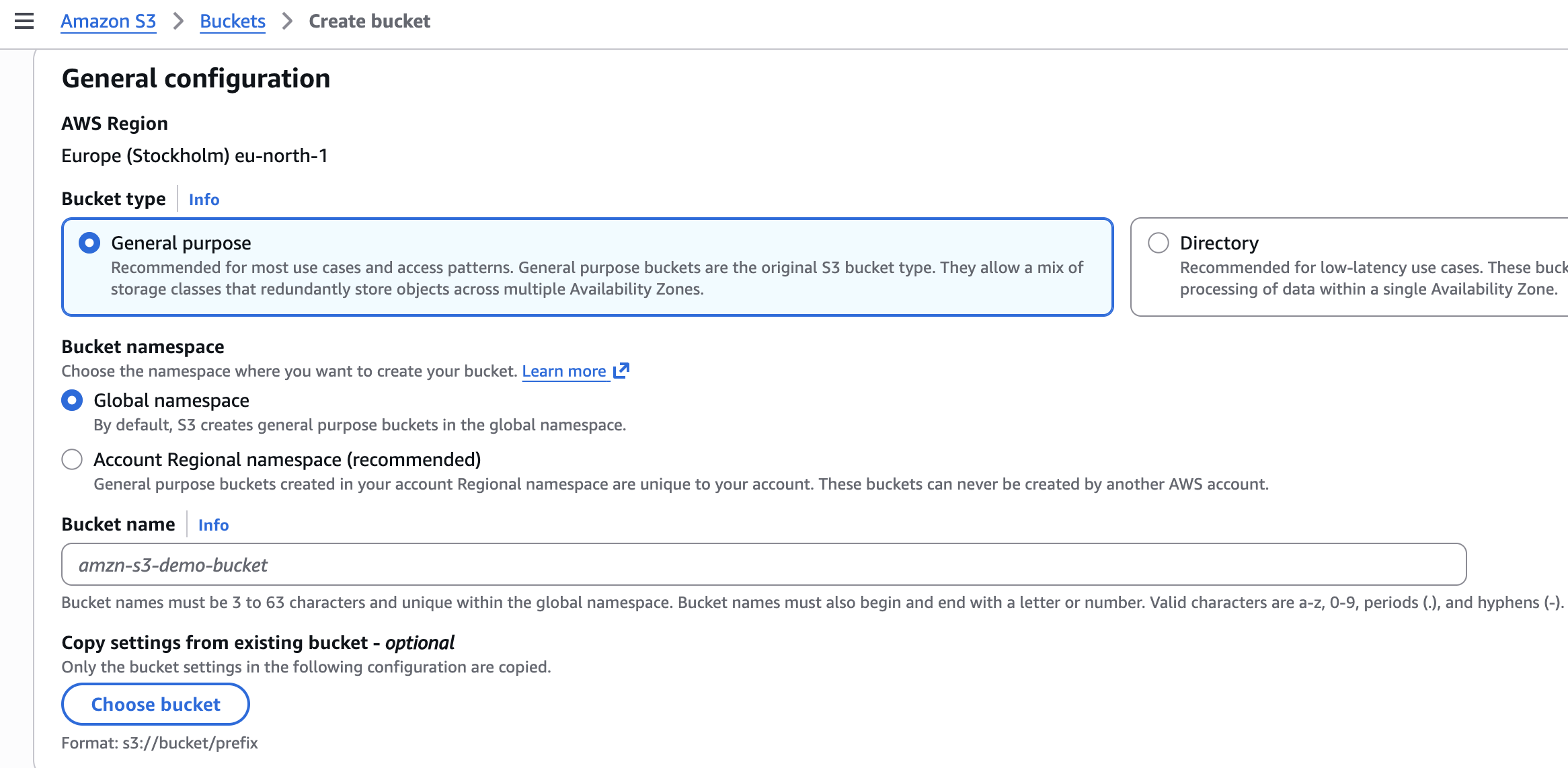
For example, the S3 bucket myapp-123456789123-eu-north-1-an created in the region EU North, would be accessible via HTTP here: https://myapp-123456789123-eu-north-1-an.s3.eu-north-1.amazonaws.com.
This is a welcome fix. Bucketsquatting was a legitimate problem, and the community has been waiting for a solution. For more detail on the bucketsquatting issue and how the new namespace addresses it, check out the excellent writeup from One Cloud Please: Bucketsquatting is (Finally) Dead.
But there is a flip side.
The New Problem: Predictable Enumeration
The new naming convention embeds the AWS account ID and region directly into the bucket name. AWS does not consider an account ID to be sensitive information. However, in the hands of a threat actor, a known account ID combined with a predictable naming format creates a straightforward path to bucket enumeration.
Previously, if an attacker wanted to discover S3 buckets belonging to a specific organization, they had to guess bucket names from a flat, global namespace with no way to confirm ownership unless the bucket was publicly accessible. That has changed.
With the new namespace, an attacker who knows the target's AWS account ID and region can construct the full bucket URL for any bucket name guess. Even if the bucket is not public, a valid response confirms it exists and belongs to that account. That confirmation alone is valuable reconnaissance. Pwned Labs runs this bucket discovery and account-ID enumeration as hands-on labs in live AWS accounts.
Attack Scenario: From Public Repo to Private Buckets
Here is a realistic scenario that demonstrates the issue.
Step 1: Discover a Bucket Name
Let's say that company's public code repository references an S3 bucket named hlogistics-website. This bucket exists in the original global namespace and serves website files. It is intentionally public.
Step 2: Determine the Region
A simple HEAD request against the global S3 endpoint reveals the bucket's region through a 307 Temporary Redirect response:
The response header x-amz-bucket-region: eu-north-1 confirms the bucket lives in Stockholm.
Step 3: Extract the AWS Account ID
Using the publicly accessible bucket and a known technique (such as the s3-account-search tool), the attacker can brute force the AWS account ID associated with the bucket. The tool progressively narrows down the 12-digit account ID:
The full account ID is found to be 123456789123.
If you want to get hands-on with this technique, check out the lab Identify the AWS Account ID from a Public S3 Bucket on the Pwned Labs platform.
Step 4: Enumerate Buckets in the New Namespace
Now the attacker has everything needed. They know the account ID (123456789123) and the region (eu-north-1). The new namespace format is predictable:
<bucket-name>-123456789123-eu-north-1-an.s3.eu-north-1.amazonaws.com
Using a tool like ffuf with a common wordlist, the attacker can brute force bucket names against this format:
A 200 or 403 response confirms the bucket exists and belongs to the target organization. Private buckets still reveal their presence. Public buckets expose whatever data is stored inside. In this case, we have discovered two buckets - files and transfer - both responding in the new account-regional namespace format.
Step 5: Brute Force Objects
Discovering a non-public bucket is just the beginning. If any objects within that bucket are individually accessible due to misconfigured ACLs, the attacker can begin brute forcing file and object names to access sensitive data.
Why This Matters
This is not a vulnerability in the traditional sense. AWS designed the namespace this way and does not treat account IDs as secrets (although knowing the AWS account IDs is so useful to a potential attacker, that it would be better if they were). But this is another example of how predictable naming conventions, combined with easily obtainable metadata, create opportunities for threat actors.
Before this change, discovering buckets in the global namespace gave no reliable signal of ownership, if the bucket itself wasn't public. A bucket named files could belong to anyone. Now, a bucket at files-123456789123-eu-north-1-an is confirmed to belong to account 123456789123. The ownership signal is built into the name.
The attack chain is straightforward:
- Find a public bucket or leaked bucket name (code repositories, config files, error messages) that belongs to a target
- Determine the region via a HEAD request
- Extract the account ID using known techniques
- Enumerate new-format buckets with a wordlist
- Brute force object names on any discovered buckets
Each step uses publicly available tools and techniques. Pwned Labs teaches the full chain, from a leaked bucket name to account-ID recovery to enumerating the new namespace, in the Amazon Cloud Attack and Defense bootcamp that leads to the ACRTP certification.
Bottom Line
Do not rely on bucket names being hard to guess. Assume your buckets can and will be discovered. Ensure every bucket has appropriate access controls, bucket policies, and monitoring in place. The fact that a bucket is not public does not mean it is invisible. Review your S3 configurations. Enable S3 server access logging or CloudTrail data events to detect enumeration attempts. And treat your AWS account ID as a piece of information that threat actors will find.
Practice this at Pwned Labs
Pwned Labs runs S3 discovery and enumeration as hands-on labs with live, intentionally vulnerable buckets. The four labs below are free.
- Identify the AWS Account ID from a Public S3 Bucket (Free, Beginner): recover the owning AWS account ID from a public bucket by probing an s3:ResourceAccount policy condition.
- AWS S3 Enumeration Basics (Free, Beginner): enumerate an exposed S3 bucket with the AWS CLI and exfiltrate credentials to get a foothold.
- S3 Bucket Brute Force to Breach (Free, Beginner): brute force S3 bucket names across regions with ffuf, recover leaked AWS keys, then read a secret from SSM Parameter Store and invoke a Lambda function.
- Exploit Weak Bucket Policies for Privileged Access (Free, Beginner): read a bucket policy to reach objects that listing hides, exfiltrate a protected file, and reuse the credentials inside it.
Frequently asked questions
Does the new S3 account-regional namespace stop bucket enumeration?
No. It ends bucketsquatting, where attackers pre-register names, but it embeds the AWS account ID and region in every bucket name. An attacker who knows the account ID and region can build the exact URL for any bucket-name guess, and a valid response confirms the bucket exists and belongs to that account even when it is not public.
How does an attacker find the AWS account ID behind an S3 bucket?
From a public bucket, a HEAD request returns the region, and a tool such as s3-account-search brute forces the 12-digit account ID using an s3:ResourceAccount policy condition. With the account ID and region, the attacker can then enumerate buckets in the predictable new-namespace format.
Is an AWS account ID sensitive?
AWS does not treat an account ID as a secret. The point this post makes is that combining a known account ID with a predictable naming format turns it into a straightforward path to confirming and enumerating a target’s buckets, so it is worth protecting as useful reconnaissance for an attacker.
How do I detect S3 bucket enumeration?
Enable S3 server access logging or CloudTrail S3 data events, which are off by default, and watch for a high volume of not-found responses, the signature of name guessing. Enforce account-level block public access and per-bucket policies so that a discovered bucket does not also expose its objects.
Where can I practice S3 enumeration hands-on?
Pwned Labs runs S3 discovery as free labs with live, intentionally vulnerable buckets, including AWS S3 Enumeration Basics and Identify the AWS Account ID from a Public S3 Bucket, so you build the chain described here against real infrastructure rather than reading about it.
Which certification covers AWS S3 and account enumeration?
The Amazon Cloud Red Team Professional (ACRTP) from Pwned Labs covers AWS enumeration, S3 abuse, IAM privilege escalation and lateral movement, and is earned through the Amazon Cloud Attack and Defense bootcamp and assessed hands-on in a live AWS account.
About Pwned Labs
Pwned Labs is a hands-on cloud and AI offensive security training platform. It runs real-world attack labs and bootcamps for AWS, Azure, GCP, Kubernetes and AI systems, including the ACRTP, MCRTP, GCRTP, KRTP and AISRTP certifications. Free labs are at pwnedlabs.io/explore.