

The whoAMI attack abuses AMI name confusion: an attacker publishes a public AMI with a name similar to a trusted one, and any EC2 launch that selects an AMI by name without pinning the owner can pick up the attacker’s image. An AWS Declarative Policy can enforce an allowed list of AMI providers across an organization, so only images from trusted accounts launch. Pwned Labs teaches the whoAMI attack and the declarative policy that blocks it hands-on in live AWS accounts.
The Attack 💥
Pwned Labs teaches AWS guardrails such as declarative policies, and the attacks they stop, hands-on in live AWS accounts.
data "aws_ami" "ubuntu" { most_recent = true filter { name = "name" values = ["ubuntu/images/hvm-ssd/ubuntu-focal-20.04-amd64-server-*"] }}resource "aws_instance" "web_server" { ami = data.aws_ami.ubuntu.id instance_type = "t2.micro"}
owners attribute in the Terraform code.data "aws_ami" "ubuntu" { most_recent = true filter { name = "name" values = ["ubuntu/images/hvm-ssd/ubuntu-focal-20.04-amd64-server-*"] } owners = ["099720109477"] # Canonical}Defining Security Guardrails with Declarative Policies 🛡️
- AWS Organizations must be set up. See the AWS documentation.
- AWS Organizations Management Policies must be enabled. See the AWS documentation.
099720109477 ) are allowed to be used. We can choose from three different state options:- enabled - Any AMI that does not meet the policy will be blocked from use for **new** instances.
- disabled - Nothing will happen as the policy is disabled.
- audit_mode - Any AMI that does not meet the policy will be marked with `Not Allowed` in the console and `ImageAllowed: false` in the CLI but these can still be used.
{ "ec2_attributes": { "allowed_images_settings": { "state": { "@@assign": "audit_mode" }, "image_criteria": { "criteria_1": { "allowed_image_providers": { "@@assign": [ "amazon", "099720109477" ] } } } } }}
Enabling the Declarative Policy in Audit Mode
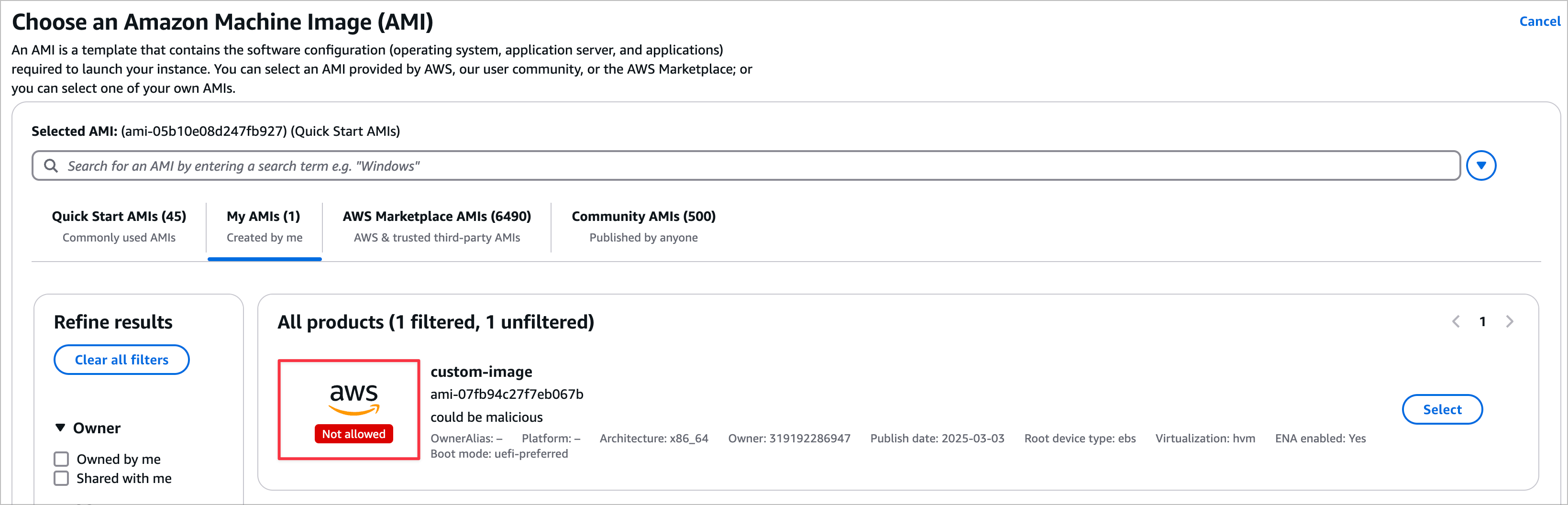
$ aws --region us-east-1 ec2 describe-images --owners 111111111111{ "Images": [ { [SNIP] "Description": "Do you trust me?", "EnaSupport": true, "Hypervisor": "xen", "Name": "Attacker created AMI", "RootDeviceName": "/dev/xvda", "RootDeviceType": "ebs", "SriovNetSupport": "simple", "VirtualizationType": "hvm", "BootMode": "uefi-preferred", "ImdsSupport": "v2.0", "SourceInstanceId": "i-0fa570802e5bec65a", "ImageAllowed": false, "SourceImageId": "ami-05b10e08d247fb927", [SNIP]Enabling the Declarative Policy in Enabled Mode
resource "aws_instance" "unauthorized_ami" { ami = "ami-0010edd796fd9c04d" instance_type = "t2.micro"}
$ terraform apply -auto-approve│ Error: creating EC2 Instance: operation error EC2: RunInstances, https response error StatusCode: 400, RequestID: c0416b31-be2d-4d9b-a502-a5b24243d2fb, api error InvalidAMIID.NotFound: The image id '[ami-0010edd796fd9c04d]' does not exist│ │ with aws_instance.example,│ on main.tf line 6, in resource "aws_instance" "example":│ 6: resource "aws_instance" "example" {You may be interested in understanding the impact of enabling this Declarative Policy in your AWS account. This section will help to answer some of the questions you may have.
- No impact. This only impacts newly created EC2s, not existing ones.
- You can make a copy and it will be allowed because you're now the account owner of the copied AMI.
Discovering AMIs that Violate the Declarative Policy 🕵️♂️
whoAMI-scanner
$ GOBIN=/usr/local/bin/ go install -v github.com/DataDog/whoAMI-scanner@latest$ whoAMI-scanner --profile dev --region us-east-1 --verbose[ 👀 whoAMI-scanner v1.0.0 👀 ] AWS Caller Identity: arn:aws:iam::111111111111:user/dev_user[*] Verbose mode enabled.[*] Starting AMI analysis...[*] [us-east-1] Allowed AMI Accounts status: Audit mode[1/3][us-east-1] ami-05b10e08d247fb927 being analyzed (Instance: i-0fcc6ee95cac86d93)[1/3][us-east-1] ami-05b10e08d247fb927 is a community AMI from an AWS verified account.[2/3][us-east-1] ami-0010edd796fd9c04d being analyzed (Instance: i-017f0fad886bbe247)[2/3][us-east-1] ami-0010edd796fd9c04d is a AWS marketplace AMI from a verified account.[3/3][us-east-1] ami-04b4f1a9cf54c11d0 being analyzed (Instance: i-0fed27593d49ac4fc)[3/3][us-east-1] ami-04b4f1a9cf54c11d0 is a community AMI from an AWS verified account.Summary Key:+-------------------------------+-----------------------------------------+| Term | Definition |+-------------------------------+-----------------------------------------+| Self hosted | AMIs from this account || Allowed AMIs | AMIs from an allowed account per the AWS Allowed AMIs API || Trusted AMIs | AMIs from an trusted account per user input to this tool || Verified AMIs | AMIs from Verified Accounts (Verified by Amazon) || Shared with me (Private) | AMIs shared privately with this account but NOT from a || | verified, trusted or allowed account. If you trust this || | account, add it to your Allowed AMIs API or specify it as || | trusted in the whoAMI-scanner command line. || Public, unverified, but known | AMIs from unverified accounts, but we found the account || | ID in fwdcloudsec's known_aws_accounts mapping: || | https://github.com/fwdcloudsec/known_aws_accounts. || | These are likely safe to use but worth investigating. || Public, unverified, & unknown | AMIs from unverified accounts. Be cautious with these || | unless they are from accounts you control. If not from || | your accounts, look to replace these with AMIs from || | verified accounts |+-------------------------------+-----------------------------------------+Summary: AWS's "Allowed AMI" config status by region Enabled/Audit-mode/Disabled: 0/1/0 Total Instances: 3 Total AMIs: 3 Self hosted AMIs: 0 Allowed AMIs: 0 Trusted AMIs: 0 Verified AMIs: 3 Shared with me (Private) AMIs: 0 Public, unverified, but known: 0 Public, unverified, & unknown AMIs: 0[!] Looks like you have started to use AWS's "Allowed AMIs" feature. Only configuring "Allowed AMIs" in "enabled" mode protects you against the whoAMI attack. Visit https://docs.aws.amazon.com/AWSEC2/latest/UserGuide/ec2-allowed-amis.html for more information.Bottom Line
The whoAMI attack exploits missing owner validation in AMI lookups, but AWS Declarative Policies provide a cloud-native guardrail that enforces AMI source restrictions at the organizational level, use audit mode first with whoAMI-scanner to identify existing violations, then enforce enabled mode to block unauthorized AMIs from new deployments. Pwned Labs teaches AWS attack paths and the organization-level guardrails that contain them in the Amazon Cloud Attack and Defense bootcamp that leads to the ACRTP certification.
Wrap-Up and Resources 🗞️
whoAMI-scanner tool.- whoAMI: A cloud image name confusion attack
- whoAMI-scanner
- Declarative Policies
- Declarative Policy Syntax
Practice this at Pwned Labs
Pwned Labs runs AWS attack and defense as hands-on labs in live accounts. The first two labs below are free.
- Intro to AWS IAM Enumeration (Free, Beginner): enumerate IAM users, roles, groups and policies with the AWS CLI and read what a compromised identity is allowed to do.
- Reveal Hidden Risks with AWS Security Hub CSPM (Free, Beginner): enable Security Hub CSPM, work through its findings in the console and the CLI, and decide which represent genuine risk.
- Command Injection to EC2 User Data Privilege Escalation (Premium, Beginner): turn an OS command injection on a web application into access to the IAM role attached to the EC2 instance behind it.
Frequently asked questions
What is the whoAMI attack on AWS?
It is an AMI name confusion attack. An attacker publishes a public AMI with a name that matches a trusted naming pattern, and any EC2 launch that looks up an AMI by name filter without specifying the owner can select the attacker’s image, which then runs in the victim’s account.
How do AWS Declarative Policies prevent whoAMI attacks?
A Declarative Policy is an AWS Organizations policy type that can set an allowed-images control for EC2, so only AMIs from named providers such as Amazon and Canonical can launch. In enabled mode it blocks non-compliant AMIs for new instances across every account in the organization.
What is the whoAMI-scanner tool and why use it?
whoAMI-scanner is a tool from Datadog that inventories the AMIs in use in an account and classifies them as self-hosted, allowed, verified or unverified. Because declarative policies do not affect AMIs already in use, the scanner helps you audit existing instances before you enforce the policy.
Do Declarative Policies affect existing EC2 instances?
No. The allowed-images control applies only to new instance launches. Instances already running on a non-compliant AMI keep running, which is why you audit existing usage with whoAMI-scanner and start in audit mode before switching to enabled mode.
How do I implement Declarative Policies for AMI control?
Set up AWS Organizations with management policies enabled, write a declarative policy that lists the allowed image providers, and attach it to a test OU in audit mode first. Audit mode marks non-compliant AMIs without blocking them, so you can confirm impact before moving to enabled mode. Pwned Labs teaches this kind of organization-level guardrail hands-on in live AWS accounts.
Which Pwned Labs certification covers AWS attack and defense?
The Amazon Cloud Red Team Professional (ACRTP) from Pwned Labs covers AWS attack paths and the controls that stop them. It is earned through the Amazon Cloud Attack and Defense bootcamp and assessed hands-on in a live AWS account.
About Pwned Labs
Pwned Labs is a hands-on cloud and AI offensive security training platform. It runs real-world attack labs and bootcamps for AWS, Azure, GCP, Kubernetes and AI systems, including the ACRTP, MCRTP, GCRTP, KRTP and AISRTP certifications. Free labs are at pwnedlabs.io/explore.